1Invoice A
Invoice A: $1,240.00 due Mar 3
clipboard history you can use
Find any saved clip, then combine, calculate, sort or transform it.
Clipboardia lives in the Mac menu bar and the Windows tray, runs on Linux and opens on the web. Capture, search and exact tools run on your device. AI and encrypted sync run only when you choose them, and every AI result waits for your approval.
✓Turn a copied table into CSV, TSV, Markdown or JSON in one tap.✓Fix a clip once, and Clipboardia offers to do it for you next time.✓Sum, join or replace across clips. Save the formula as a clip op.✓Inspect and approve every AI result.✓Capture screenshots, colours, text and QR codes.
Clipboardia keeps capture, search, organisation, previews and exact actions on your device. Connected AI and sync remain off until you choose them.
// 01 · custom copy rules
A little less fixing after every paste.
Create custom rules for the things you copy. Choose what to match, set a transformation and get the format you need before you paste. Or teach by example: fix a clip once, and Clipboardia offers to make it a rule. Try a few useful flows below.
Keep headings, emphasis, lists and links for your next document.
Sample clip · changes stay in this previewLaunch checklist
Keep the release small.
## Launch checklist

Keep the release **small**.

- Review the changes
- Ship the update

[Release notes](https://example.com/releases)Formatted text → Convert to Markdown → ready to paste.
Try your text, combine transformations and save a custom rule.
// 02 · feature map
The feature map groups exact local tools, review-first AI, optional encrypted sync and planned additions. Local tools always produce the same result from the same input, while AI results remain drafts until you review them.
// 03 · exact actions
Select clips and sum, sort or merge them. Run a formula such as upper, join or replace across them. Save one you use often as a clip op. Exact tools use no AI, and every result stays in the preview until you choose where it goes.
Invoice A: $1,240.00 due Mar 3
Invoice B: $860.50 due Mar 17
 + New⌄☼Ⅱ Pause
// 04 · previews and search
Clipboardia renders copied links, displays copied colours and searches every saved clip using the words you still remember.
Copied a URL? The card renders a live preview with its title, summary and status before you open it.
Any colour you copy becomes a swatch. Pick it back out in hex, RGB or HSL with one click.
Search every clip you kept by the words you remember, even offline.
// 05 · AI with review
Summarise, rewrite or reason across selected clips. Cloud AI runs only when you ask. Every result opens as a draft that names the clips it used, and nothing is saved until you approve it. Your originals are always kept.
Long thread about the Q3 launch: dates shifting, a vendor delay, two open questions on pricing and a decision buried in reply 14…
Launch moves to Oct 12. Vendor delay absorbed. Pricing decision: keep tiers, revisit in Q4.
→Use several clips in one prompt.→Inspect every draft beside its source.→Approve, edit or discard the draft while keeping every original.
// 06 · terminal
cbia is the terminal companion to the desktop app: pbcopy and pbpaste, and then some. It reaches your whole history and does exact maths. It keeps secrets off the screen for you and for the coding agents you work with.
→Copy and paste like pbcopy and pbpaste, with your history a number away.→Find any clip with cbia grep, or pick one and drop it into a command.→Exact maths with cbia calc: money, percentages, dates and fractions.→Name a clip with cbia ref, then use it anywhere as @name.→Secrets stay hidden on screen and from coding agents. cbia exec hands one to a command without printing it.→Push and pop a scratch stack that never touches your clipboard.
// 07 · context briefs
Copy and paste loses the reason you copied something. Gather the clips behind a problem, note why each one matters and where you got to, then paste that context as a debugging brief for an engineer or a plain update for everyone else. You see exactly what will leave your device first.
Customers paying with Visa debit see “Something went wrong” at checkout since Tuesday.
why I copied thisSupport's report, in the customer's own words
09:14:22Z ERROR payments: charge failed status=401 customer=ana.ruiz@example.com
Authorization: Bearer sk_live_51NcX9aQ2fT7hLmP0rV8yZ
why I copied thisThe first error after the deploy, with the request behind it
Retries must reuse the original idempotency key. A refreshed token is rejected for a retried charge.
why I copied thisSays a retried charge must reuse the original key
- key := newIdempotencyKey()
+ key := req.IdempotencyKey
why I copied thisMy fix so far: keep the key, refresh only the token
Same clips, for the engineer picking it up1,234 characters
# Checkout fails after Tuesday's deploy

## Purpose
Find why some card payments fail since the deploy

## What I tried
Rolled back the session-cookie change. Still failing.

## Constraints
Sandbox only, no production writes.

## Open questions
- Does the retry wrapper swallow the 401?
- Is staging on the same gateway config?

## Where I got to
Narrowed it to the retry wrapper in the payments client.

## Problem
### Customer report
Why it matters: Support's report, in the customer's own words
Customers paying with Visa debit see “Something went wrong” at checkout since Tuesday.

## Log excerpt
### First failing charge
Why it matters: The first error after the deploy, with the request behind it
```
09:14:22Z ERROR payments: charge failed status=401 customer=[redacted email]
Authorization: [redacted token]
```

## Documentation
### Retry rules
Why it matters: Says a retried charge must reuse the original key
https://docs.example-pay.com/retries
Retries must reuse the original idempotency key. A refreshed token is rejected for a retried charge.

## Attempted fix
### Reuse the key on retry
Why it matters: My fix so far: keep the key, refresh only the token
```
- key := newIdempotencyKey()
+ key := req.IdempotencyKey
```
What leaves this device
Found before sending 2
ana••••omBea••••yZUnreviewed details stay redacted. Detection catches common patterns, so read the brief before you share it.
// 08 · watch
Four short clips of Clipboardia doing everyday jobs. Tap one to play it here, with captions.
Turn on sync when you want your workspace on another device. Your devices encrypt the data before sending it, so the service stores ciphertext and never receives the key needed to read it.
// 09 · desktop apps
The web workspace is available now. Desktop installers remain invite-only while the beta group stays small.
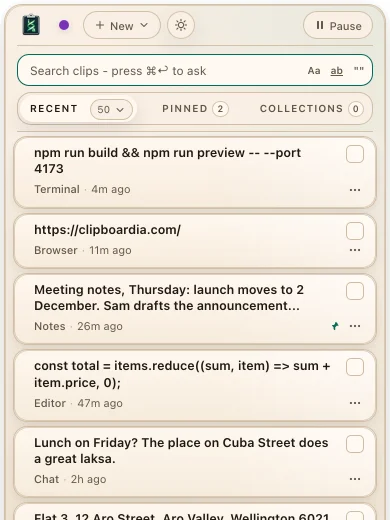
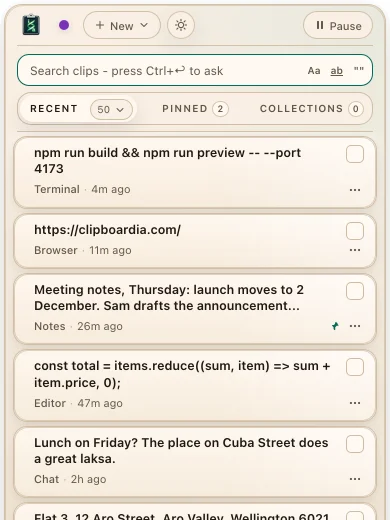
The download page has the Linux beta and how to install cbia, the terminal app.
// 10 · mobile apps
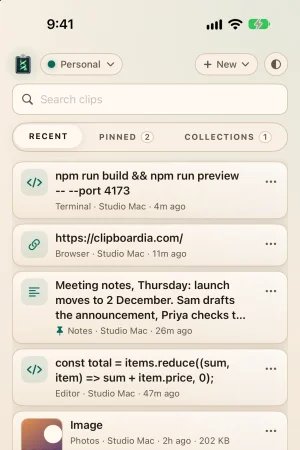
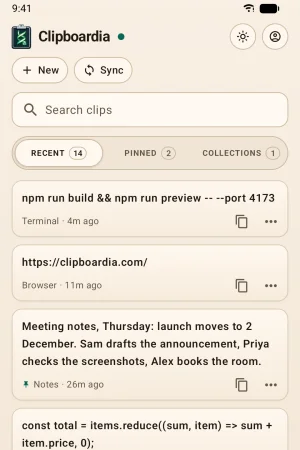
The mobile apps are in development. Capture and search on your phone, then choose whether to sync encrypted clips with your other devices.